> For the complete documentation index, see [llms.txt](https://cavedu.gitbook.io/cavedu/llms.txt). Markdown versions of documentation pages are available by appending `.md` to page URLs; this page is available as [Markdown](https://cavedu.gitbook.io/cavedu/sheng-wu-yi-xue-cai-liao-bao/keyes-ad8232-xinljian-ce-gan-ce-qi.md).
# Keyes - AD8232心率監測感測器
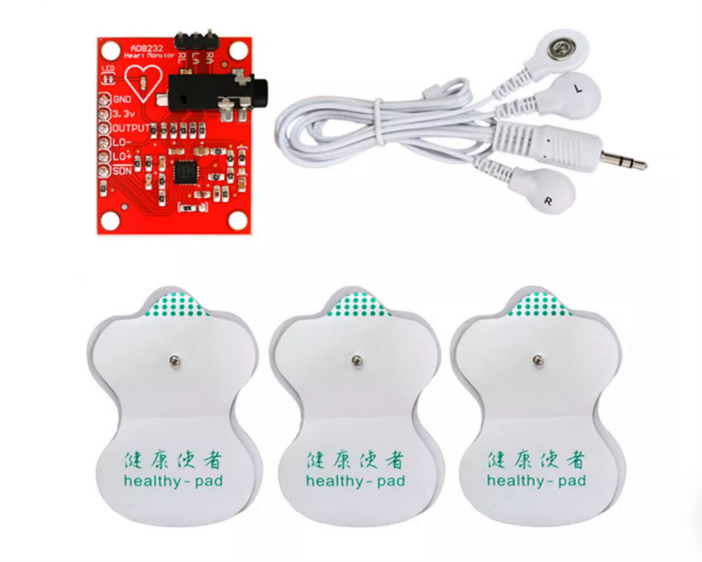
Keyes - AD8232心律監測感測器可用於量測人體心臟電活動的 ECG 前端模組,可輸出清晰的心電波形。
{% hint style="danger" %} **注意:**
* **避免電線晃動造成雜訊**
* **人體動作會影響訊號**
* **電極需確實貼合皮膚**
* **本感測器不能用於醫療目的。**
{% endhint %}
### 測量前準備
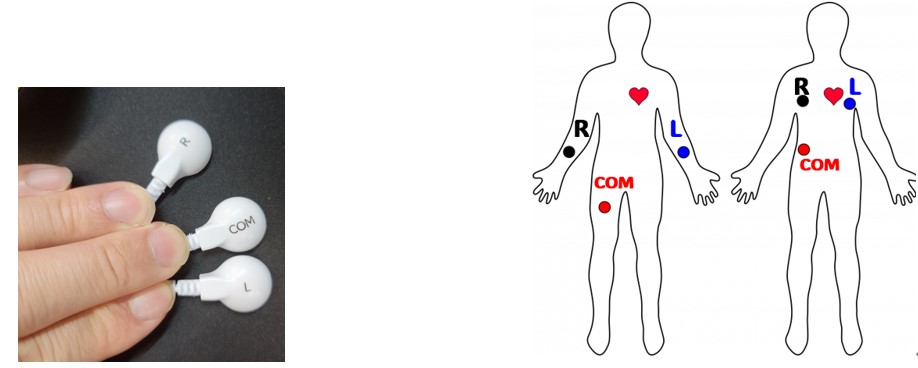
將貼片的R、L、COM 極分別貼到右胸/右手、左胸/左手、右腿/右腹處,如下圖所示
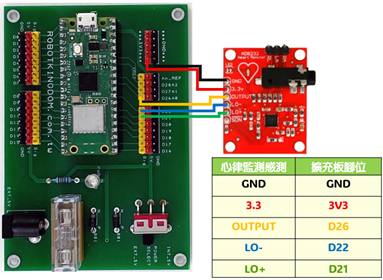
### Keyes - AD8232心率監測感測器模組電路圖
* Raspberry Pi Pico W
* Raspberry Pi Pico W 擴充板
* Keyes - AD8232心率監測感測
{% hint style="success" %}
***Keyes - AD8232心律監測感測器是類比訊號輸入。本範例模組的 OUTPUT 腳位需接至Raspberry Pi Pico擴充板 A0/D26 腳位。***
{% endhint %}
### Arduino 程式如下
```
#include
void setup() {
// initialize the serial communication:
Serial.begin(9600);
pinMode(21, INPUT); // LO + 接 D21 腳位
pinMode(22, INPUT); // LO - 接 D22 腳位
}
void loop() {
//偵測 LO + 或 LO - 電擊片是否脫落 ,若脫落則顯示為異常(!)
if((digitalRead(21) == 1)||(digitalRead(22) == 1)){
Serial.println('!');
}
else{
// send the value of analog input 0:
Serial.println(analogRead(A0));
}
//Wait for a bit to keep serial data from saturating
delay(1);
}
```
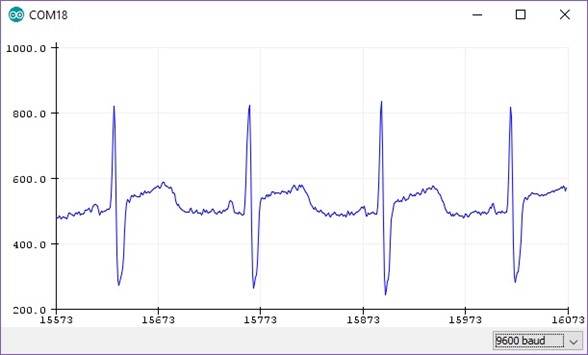
### 程式執行結果
在工具 -> 序列繪圖家 ,開啟後可以看見類似下圖的畫面。