> For the complete documentation index, see [llms.txt](https://cavedu.gitbook.io/cavedu/llms.txt). Markdown versions of documentation pages are available by appending `.md` to page URLs; this page is available as [Markdown](https://cavedu.gitbook.io/cavedu/sheng-wu-yi-xue-cai-liao-bao/keyes-shou-zhi-zhen-ce-xin-tiao-mo-zu-guang-liang-ce-shi.md).
# Keyes -手指偵測心跳模組(光量測式)
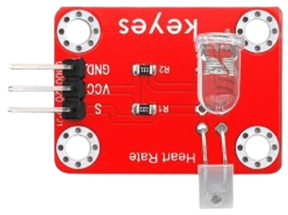
手指偵測心跳模組(光量測式)是利用血液對光吸收量隨心跳變化的特性,透過 LED 與光感測器量測手指血流,進而推算心跳速率。
{% hint style="danger" %} **注意:**
* **避免電線晃動造成雜訊**
* **人體動作會影響訊號**
* **電極需確實貼合皮膚**
* **本感測器不能用於醫療目的。**
{% endhint %}
### 測量前準備
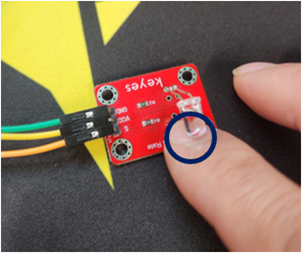
將任意手指(建議食指)的前側指腹,放置在光感測器上方。
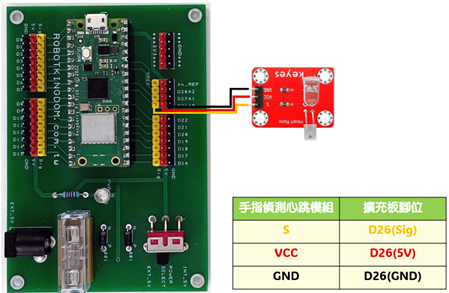
### Keyes -手指偵測心跳模組(光量測式)模組電路圖
* Raspberry Pi Pico W
* Raspberry Pi Pico W 擴充板
* 手指偵測心跳模組(光量測式)
{% hint style="success" %}
***手指偵測心跳模組(光量測式)是類比訊號輸入。本範例模組的 S 腳位需接至Raspberry Pi Pico擴充板 A0/D26 腳位。***
{% endhint %}
### Arduino 程式如下
```
#include
#define samp_siz 4
#define rise_threshold 4
// Pulse Monitor Test Script
int sensorPin = A0;
void setup() {
Serial.begin(9600);
}
void loop ()
{
float reads[samp_siz], sum;
long int now, ptr;
float last, reader, start;
float first, second, third, before, print_value;
bool rising;
int rise_count;
int n;
long int last_beat;
for (int i = 0; i < samp_siz; i++)
reads[i] = 0;
sum = 0;
ptr = 0;
while(1)
{
// calculate an average of the sensor
// during a 20 ms period (this will eliminate
// the 50 Hz noise caused by electric light
n = 0;
start = millis();
reader = 0.;
do
{
reader += analogRead (sensorPin);
n++;
now = millis();
}
while (now < start + 20);
reader /= n; // we got an average
// Add the newest measurement to an array
// and subtract the oldest measurement from the array
// to maintain a sum of last measurements
sum -= reads[ptr];
sum += reader;
reads[ptr] = reader;
last = sum / samp_siz;
// now last holds the average of the values in the array
// check for a rising curve (= a heart beat)
if (last > before)
{
rise_count++;
if (!rising && rise_count > rise_threshold)
{
// Ok, we have detected a rising curve, which implies a heartbeat.
// Record the time since last beat, keep track of the two previous
// times (first, second, third) to get a weighed average.
// The rising flag prevents us from detecting the same rise more than once.
rising = true;
first = millis() - last_beat;
last_beat = millis();
// Calculate the weighed average of heartbeat rate
// according to the three last beats
print_value = 60000. / (0.4 * first + 0.3 * second + 0.3 * third);
Serial.print("心跳數:");
Serial.print(print_value);
Serial.print("\n");
third = second;
second = first;
}
}
else
{
// Ok, the curve is falling
rising = false;
rise_count = 0;
}
before = last;
ptr++;
ptr %= samp_siz;
}
}
```
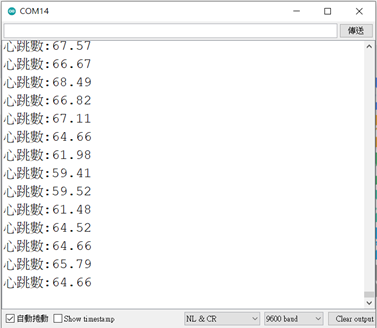
### 程式執行結果