> For the complete documentation index, see [llms.txt](https://cavedu.gitbook.io/cavedu/llms.txt). Markdown versions of documentation pages are available by appending `.md` to page URLs; this page is available as [Markdown](https://cavedu.gitbook.io/cavedu/rk005/module_ui/gas.md).
# 氣體感測器Gas Sensor(MQ7)模組
## 氣體感測器Gas Sensor(MQ7)模組
**專案說明**
使用「Raspberry Pi Pico W」連接「氣體模組(MQ7)」, 讀取氣體模組(MQ7)的數值變化。此**氣體模組(MQ7)**包含於「洞洞五教學材料包」內。
**感測器調整說明**
精密電阻旋鈕可以調整氣體濃度測量範圍,如下圖所示。

### **氣體模組(MQ7)電路圖**
* Raspberry Pi Pico W
* Raspberry Pi Pico W 擴充板
* 氣體模組(MQ7)
**氣體模組(MQ7)**是**類比訊號**輸入, 可以接「A0\~ A2」的Raspberry Pi Pico擴充板訊號端上。 本範例連接到「A0」

### **BlocklyDuino 程式 (GAS)**
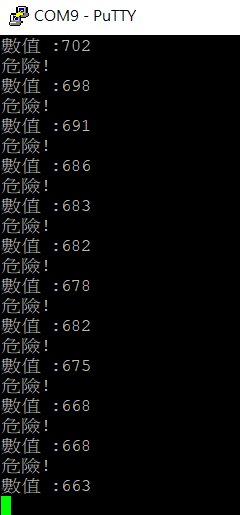
偵測氣體的濃度變化,若**氣體濃度大於500,則顯示「危險!」;反之顯示「安全!」**。

### **Arduino 程式(GAS.ino)如下**
```
void setup()
{
Serial.begin(9600);
}
void loop()
{
int GAS = analogRead(A0);
if (GAS > 500) {
Serial.println("危險!");
} else {
Serial.println("安全!");
}
Serial.println((String("數值 :")+String(GAS)));
delay(100);
}
```
### **程式執行結果:**
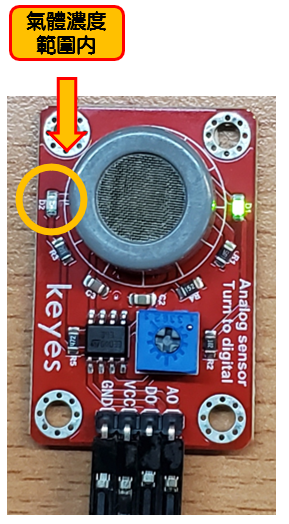
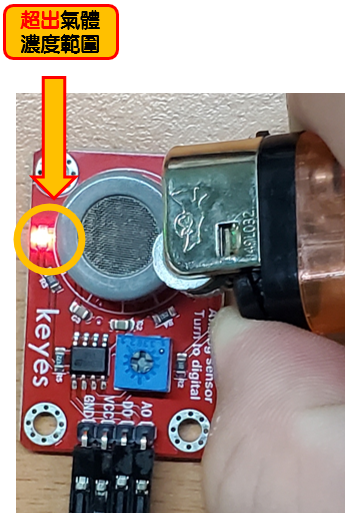
偵測氣體的濃度變化,若**氣體濃度大於500,則顯示「危險!」;反之顯示「安全!」**。
以下是**安全範例**
\|  | \
| \ |
\| ------------------------------------------------------------------- | ------------------------------------------------------------------------------------------------------- |
以下**危險範例**
|
|
\| ------------------------------------------------------------------- | ------------------------------------------------------------------------------------------------------- |
以下**危險範例**
|  |
|  |
| ------------------------------------------------------------------------------------------------------------------------------------------------------------------------------------------------------ | ------------------------------------------------------------------------------------------------------------------------------------------------------------------------------------------------------ |
|
| ------------------------------------------------------------------------------------------------------------------------------------------------------------------------------------------------------ | ------------------------------------------------------------------------------------------------------------------------------------------------------------------------------------------------------ |